Your Time:
Our Time:
← Back to discussions

Holiday Hours Shortcode Not Working

Need help with a different issue? Search the forums or open a new ticket.
Open a support ticket

This topic has 26 replies, 3 voices, and was last updated 9 years, 6 months ago by Fem.

  • 2016-11-27 at 10:31 pm
    Support Expired
    #17928
    joco
    Participant
    • Topics: 11
    • Replies: 30
    • Total posts: 41
    • Post count: 40

    I have added the following shortcode
    [iva_bhrs_holidays id="Test"]

    However its not displaying my Holiday Hours.

    I am using 3.6.3 and my Holiday name is Test.

    Please help.

    2016-11-28 at 10:26 am
    #17930
    Anonymous
    Inactive
    • Topics: 0
    • Replies: 3227
    • Total posts: 3227
    • Post count: 0

    Try using name instead of id like this [iva_bhrs name="officehours-test"]

    2016-11-28 at 10:39 am
    Support Expired
    #17932
    joco
    Participant
    • Topics: 11
    • Replies: 30
    • Total posts: 41
    • Post count: 40

    I have tried numerous names. Like “Christmas” and “Fouth of July”. Nothing worked.

    2016-11-28 at 10:41 am
    #17933
    Anonymous
    Inactive
    • Topics: 0
    • Replies: 3227
    • Total posts: 3227
    • Post count: 0

    If you can provide us WP Logins to your website with URL then we can take a closer look at it. Make sure you set the post as private reply so that only admin can see your wp-logins.
    Note: Before providing the wp-logins to any support staff, kindly please make sure you take a backup of everything including wordpress content, theme options, widgets etc.

    2016-11-28 at 10:46 am
    Support Expired
    #17934
    joco
    Participant
    • Topics: 11
    • Replies: 30
    • Total posts: 41
    • Post count: 40
    This reply has been marked as private.
    2016-11-28 at 11:03 am
    #17935
    Anonymous
    Inactive
    • Topics: 0
    • Replies: 3227
    • Total posts: 3227
    • Post count: 0

    I have created a “Test” Page and checked http://www.veloconcepts.com/test/, it is working fine. Please see the test page how I created, you’ll come to know. You have to select the start and end dates for the upcoming holidays not for the past holidays.

    2016-11-28 at 5:57 pm
    Support Expired
    #17950
    joco
    Participant
    • Topics: 11
    • Replies: 30
    • Total posts: 41
    • Post count: 40

    Yes I see that and it worked there too. But it doesn’t work in the section of my homepage where the locations and hours are.

    New Home

    2016-11-28 at 6:13 pm
    #17951
    Fem
    Keymaster
    • Topics: 2
    • Replies: 5215
    • Total posts: 5217
    • Post count: 6003

    I see its working I just changed the time to 7pm and the timings are also perfect and it shows the text for that holiday as Test Holiday as well as the hours also closed.

    2016-11-28 at 7:32 pm
    Support Expired
    #17954
    joco
    Participant
    • Topics: 11
    • Replies: 30
    • Total posts: 41
    • Post count: 40

    Im not sure what you are talking about.

    1) Your TEST, didnt display the holiday
    2) I updated the Test and now it no longer works
    3) I added Christmas and it doesn’t display at all.

    2016-11-29 at 10:24 am
    #17968
    Anonymous
    Inactive
    • Topics: 0
    • Replies: 3227
    • Total posts: 3227
    • Post count: 0

    In your Holidays Section, you haven’t created any holiday with the name “Test” but you have created a holiday with the name “Christmas”. Now you have to add the holidays shortcode in any of your pages like this [iva_bhrs_holidays id="Christmas"] then it will display the holidays.
    Look at the page I have created with the name Test t hen you will understand.

    2016-11-29 at 2:33 pm
    Support Expired
    #17977
    joco
    Participant
    • Topics: 11
    • Replies: 30
    • Total posts: 41
    • Post count: 40

    You are not looking in the correct spot. Its not working in the Location & Hours pages.

    See here.

    New Home

    Here is the code from the contact section (Brooklyn -> Theme Options -> Contact -> Left Area Content)

    Location & Hours
    
    <iframe style="border: 0;" src="https://www.google.com/maps/embed?pb=!1m18!1m12!1m3!1d3124.915517911278!2d-78.00386969999998!3d38.44342030000001!2m3!1f0!2f0!3f0!3m2!1i1024!2i768!4f13.1!3m3!1m2!1s0x89b4214f5d397761%3A0x5481ac5ba486c79c!2s19014+Crossroad+Pkwy%2C+Culpeper%2C+VA+22701!5e0!3m2!1sen!2sus!4v1427765607881" width="400" height="250" frameborder="0"></iframe>
    
    <strong>Store Hours</strong>
    
    [iva_bhrs name="storehoursenew"]
    
    [iva_bhrs_holidays id="Christmas"]
    2016-11-29 at 2:35 pm
    Support Expired
    #17978
    joco
    Participant
    • Topics: 11
    • Replies: 30
    • Total posts: 41
    • Post count: 40

    Also even on your test page it doesn’t work properly. It doesn’t show the hours, it doesn’t even show that the store is closed, it just lists dates.

    2016-11-29 at 3:29 pm
    #17979
    Fem
    Keymaster
    • Topics: 2
    • Replies: 5215
    • Total posts: 5217
    • Post count: 6003

    Yes, Holiday shortcode is for listing holidays not the hours on that holiday. But if you want to link the holidays to the hours you created then you need to assign that to the specific hours in the holiday section. It will display the time with Holiday text below the time indicating the hours as well that today is Christmas or whatsoever text you have given for that holiday.

    If you want I can explain more in depth if you are on Skype.

    • This reply was modified 9 years, 9 months ago by Fem.
    2016-11-29 at 3:54 pm
    #17981
    Fem
    Keymaster
    • Topics: 2
    • Replies: 5215
    • Total posts: 5217
    • Post count: 6003

    If you have anything new feature or something Kindly please contact us via Skype so that we can consider adding that feature in the updates and feel free to ask questions if we are not clear.

    2016-11-29 at 7:19 pm
    Support Expired
    #17988
    joco
    Participant
    • Topics: 11
    • Replies: 30
    • Total posts: 41
    • Post count: 40

    Ok. But this still doesn’t work at all! Did you see the link I provided?

    2016-11-30 at 11:17 am
    #17999
    Anonymous
    Inactive
    • Topics: 0
    • Replies: 3227
    • Total posts: 3227
    • Post count: 0

    You can contact us on skype so that we can explain more in depth on how to use the shortcode.

    2016-11-30 at 7:57 pm
    Support Expired
    #18007
    joco
    Participant
    • Topics: 11
    • Replies: 30
    • Total posts: 41
    • Post count: 40

    Yes I contacted some one via Skype and they confirmed that its not working properly. Specifically the holiday hours are not rendering in the proper location on the page. Supposedly a fix is in the works.

    Additionally a change is being made to properly handle and display Holiday hours, so if we are closed on a Holiday that is reflected in the store hours.

    2016-12-06 at 7:46 pm
    Support Expired
    #18249
    joco
    Participant
    • Topics: 11
    • Replies: 30
    • Total posts: 41
    • Post count: 40

    What is the status of my fixes? The Holiday hours are still rendering in a different location on the page plus the updates to the listing of holiday hours.

    2016-12-07 at 1:01 pm
    #18254
    Anonymous
    Inactive
    • Topics: 0
    • Replies: 3227
    • Total posts: 3227
    • Post count: 0

    Yes, we are working on this and we’ll make an update to the plugin with in a day or couple of days.

    2016-12-15 at 1:20 am
    Support Expired
    #18321
    joco
    Participant
    • Topics: 11
    • Replies: 30
    • Total posts: 41
    • Post count: 40

    Ok its now been over a week. This is still not working and its messing up my site. Where is the fix???

    2016-12-16 at 3:26 am
    Support Expired
    #18332
    joco
    Participant
    • Topics: 11
    • Replies: 30
    • Total posts: 41
    • Post count: 40

    Please provide an update. This theme doesnt work as advertised. I now have holidays showing up randomly in my display and there still is a display bug.

    2016-12-18 at 10:26 pm
    Support Expired
    #18338
    joco
    Participant
    • Topics: 11
    • Replies: 30
    • Total posts: 41
    • Post count: 40

    Even after the most recent update which was supposed to fox these issues its still not working 100%.

    The Holidays do not display inline with the hours.

    2016-12-19 at 4:21 pm
    #18345
    Anonymous
    Inactive
    • Topics: 0
    • Replies: 3227
    • Total posts: 3227
    • Post count: 0

    Kindly show us how you want to display with a screenshot so that we can help you out. If you can come on skype we can explain you in detail.

    2016-12-19 at 10:10 pm
    Support Expired
    #18347
    joco
    Participant
    • Topics: 11
    • Replies: 30
    • Total posts: 41
    • Post count: 40

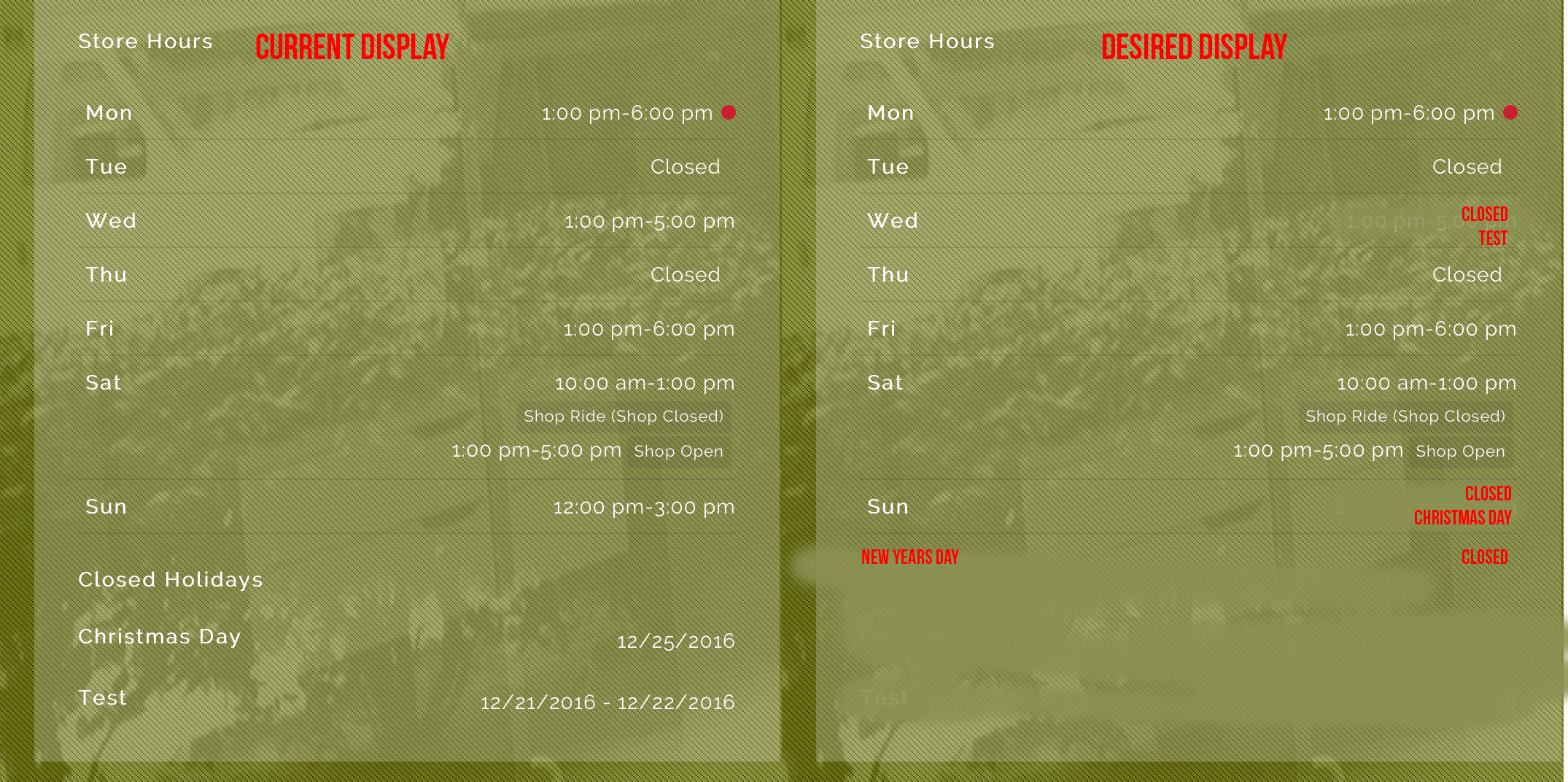
    Ok, Here is what I am looking for.

    Assuming the following
    The Test Holiday takes place this Wednesday (12/21)
    The Christmas Day Holiday takes place this Sunday (12/25)
    And New Years Day takes place on (1/1)

    Proposed Design

    2017-02-13 at 7:32 pm
    Support Expired
    #19190
    joco
    Participant
    • Topics: 11
    • Replies: 30
    • Total posts: 41
    • Post count: 40

    What is the status of this? Ive been told this would have been implemented by now. Please advise.

    Joe

    2017-02-24 at 9:34 pm
    Support Expired
    #19379
    joco
    Participant
    • Topics: 11
    • Replies: 30
    • Total posts: 41
    • Post count: 40

    Come on folks… what is the deal here?

    2017-02-27 at 5:15 pm
    #19401
    Fem
    Keymaster
    • Topics: 2
    • Replies: 5215
    • Total posts: 5217
    • Post count: 6003

    It’s already updated. Kindly please download the latest version from codecanyon which is 4.0.0 and let me know.

You must be logged in to reply to this topic.