Dear Aivah,
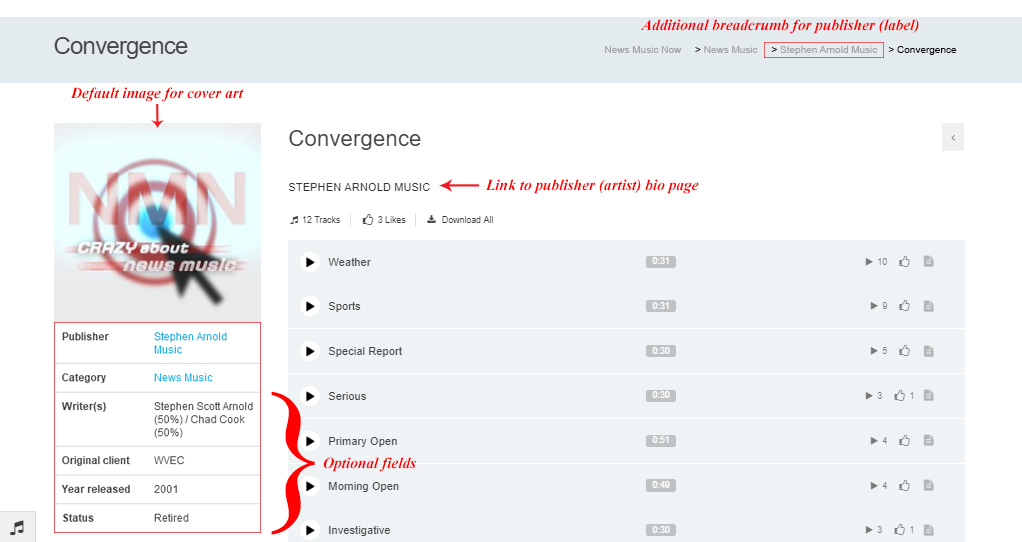
My website hosts just one genre of music (news music) and the default fields/order of the Album info doesn’t really apply to my music. I’ve made a mockup to show the Album info as I need it to look. Basically, I need help renaming a few fields and adding a few new ones.
How can I change the name/order of the default fields (on the admin-input page and album display page)? How would I go about making these changes without breaking MusicPlay for future updates?
The Label field needs to be renamed “Publisher” and the Genre field needs to be renamed “Category” (as all music is the same genre, but classified into 2 categories). I need to add 4 optional (non-searchable) text fields (Writer, Original client, Year released, Status) in place of the other ones that are built in (e.g. release date/catalog ID).
I also need to add an extra breadcrumb layer for “Publisher” (Label).
As I have a lot of albums to add (about 500), I want to make sure that my fields are complete before I start to upload albums. I appreciate your help with this!
-Jeremy